Built in Canada, for Canadian mortgage brokers

The work that eats your evenings, done in minutes.

BrokerBoxx reads the documents, runs the numbers, applies the lender rules, and hands you a polished report with your name and licence on it. You review it, send it, and move on to the next file.

Full access from day one. Card required at signup, first charge after 14 days, cancel anytime before then and pay nothing.
app.brokerboxx.ca/dashboard
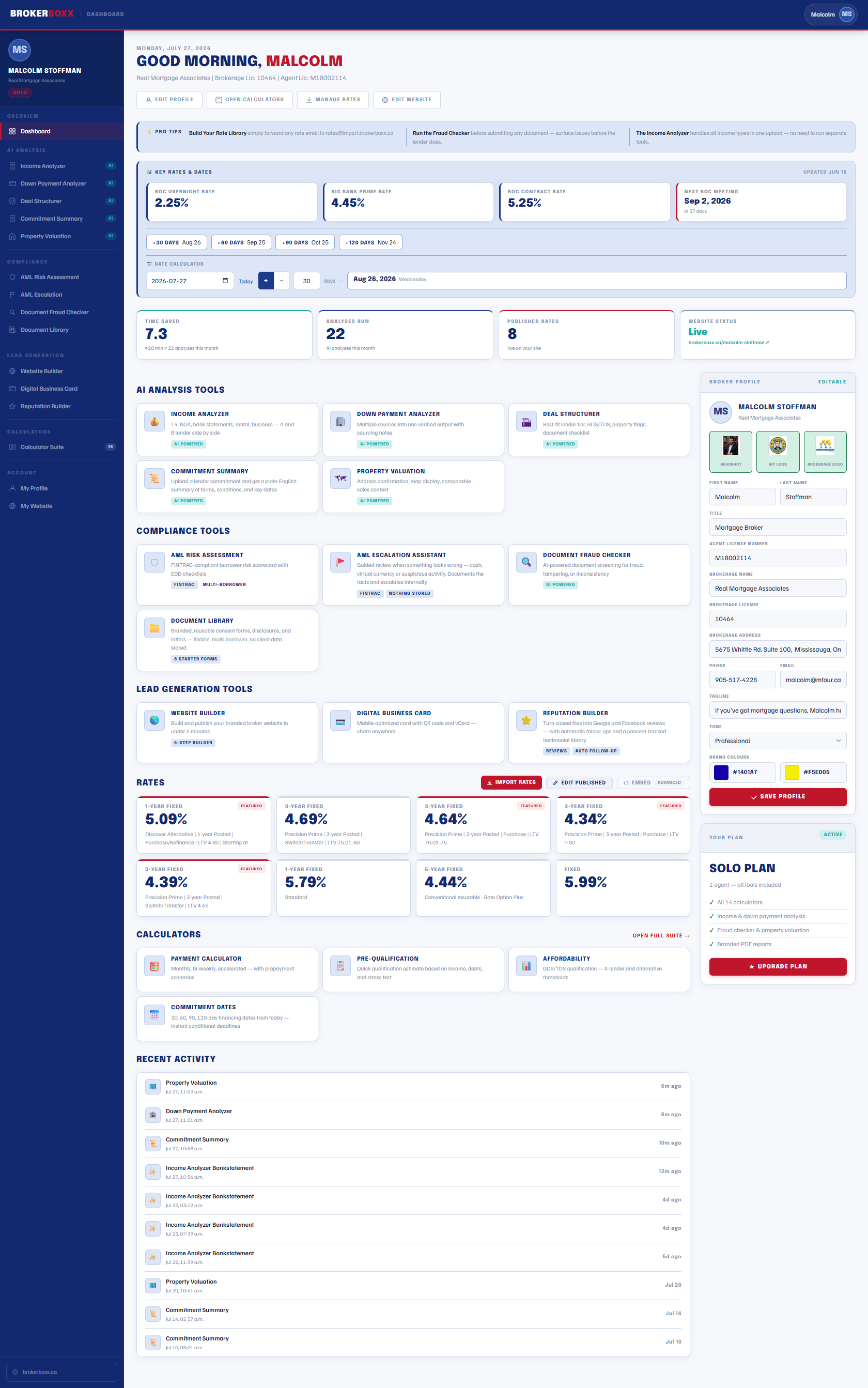
The BrokerBoxx dashboard: AI analysis tools, compliance tools, live rates, calculators, and recent activity in one place
5
AI Analysis Tools
14
Canadian Calculators
12
Income Types Handled
0
Client Documents Stored
The Part of the Job Nobody Signed Up For

You became a broker to close deals. Not to re-key bank statements at 9 p.m.

The self-employed file

Seventeen bank statements, three accounts, income to qualify two different ways. That is your whole evening, and one typo changes the answer.

📄
The plain Word template

Your client gets a screenshot of a spreadsheet. The bank rep down the street hands them a bound, branded package. Guess who looks like the institution.

⚖️
The compliance file you hope nobody asks for

FINTRAC expects a documented risk assessment on every borrower. Most brokers are one audit away from finding out theirs lives in their head.

📱
The rate sheet from last Tuesday

Rates moved twice since your website was updated. Your web guy is on vacation. Your site is quietly quoting numbers you can no longer get.

What BrokerBoxx Does About It

One login. Every tool a working broker actually needs.

Upload the documents and get qualifying income, down payment verification, fraud screening, and property valuation in minutes, each one delivered as a client-ready report carrying your name, your licence, and your brand.

Behind the tools sits a compliance layer built for FINTRAC and Canadian provincial rules, a live rate system you update from your phone, and a professional website generated from your profile.

Built by a practicing Canadian broker. Semi-annual compounding, the stress test, CMHC rules, and land transfer tax for every province are in the math, not bolted on.

AI Analysis Tools

Document work that took half an hour now takes about a minute

Every analysis tool follows one pattern: upload or enter what you have, get a verified answer and a branded report. Every output is built for you to review and stand behind, because you are the licensed professional and it says so on the page.

AI Powered

Income Analyzer

Every income type your clients actually have, qualified the way lenders actually count it. T4 employment, self-employed, business owner, rental, pension, investment, disability, support, EI, foreign, bank statement, and stated income, all in one tool.

A-lender and B-lender side by side, so you see both paths before you pick a lender
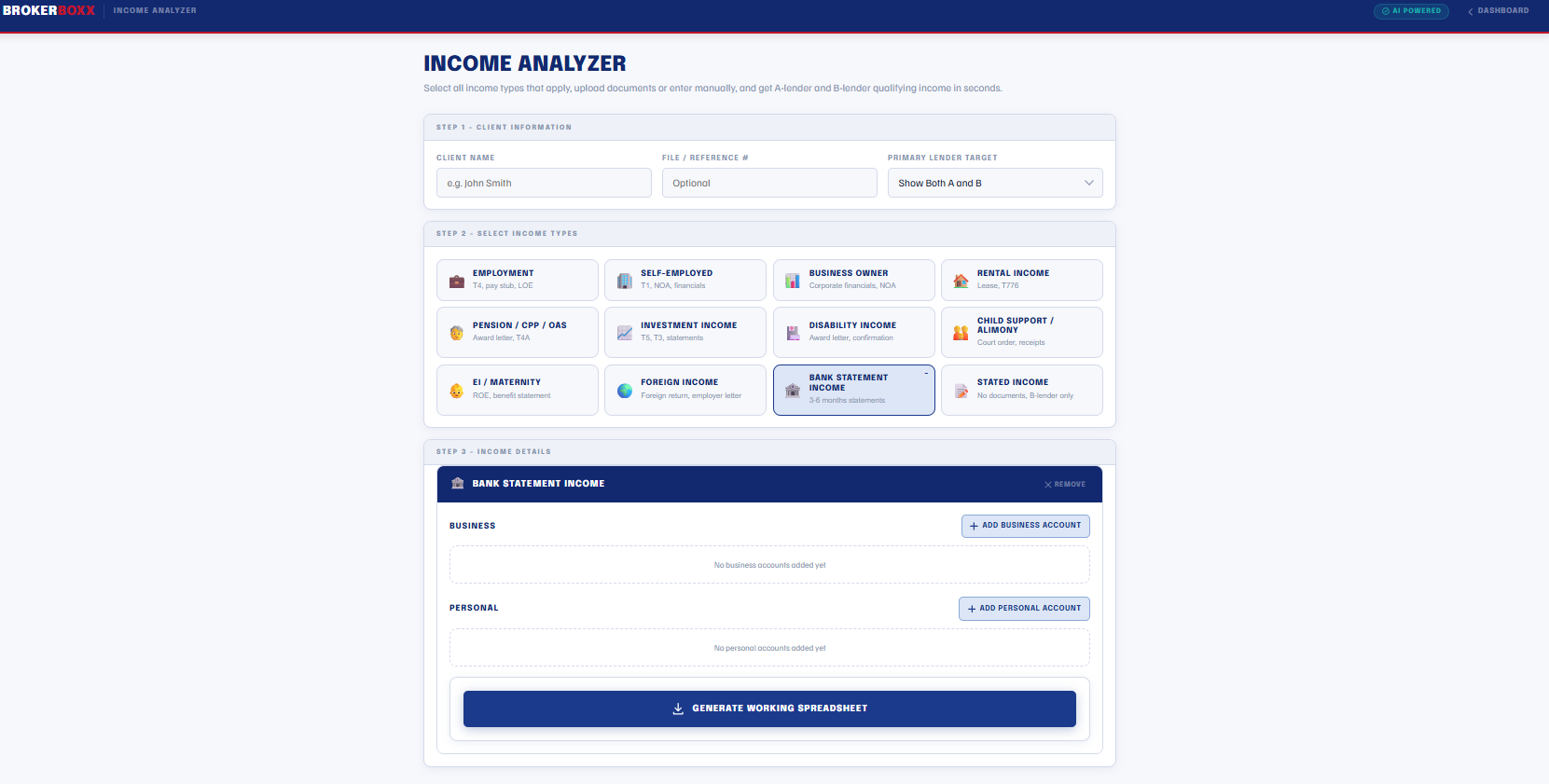
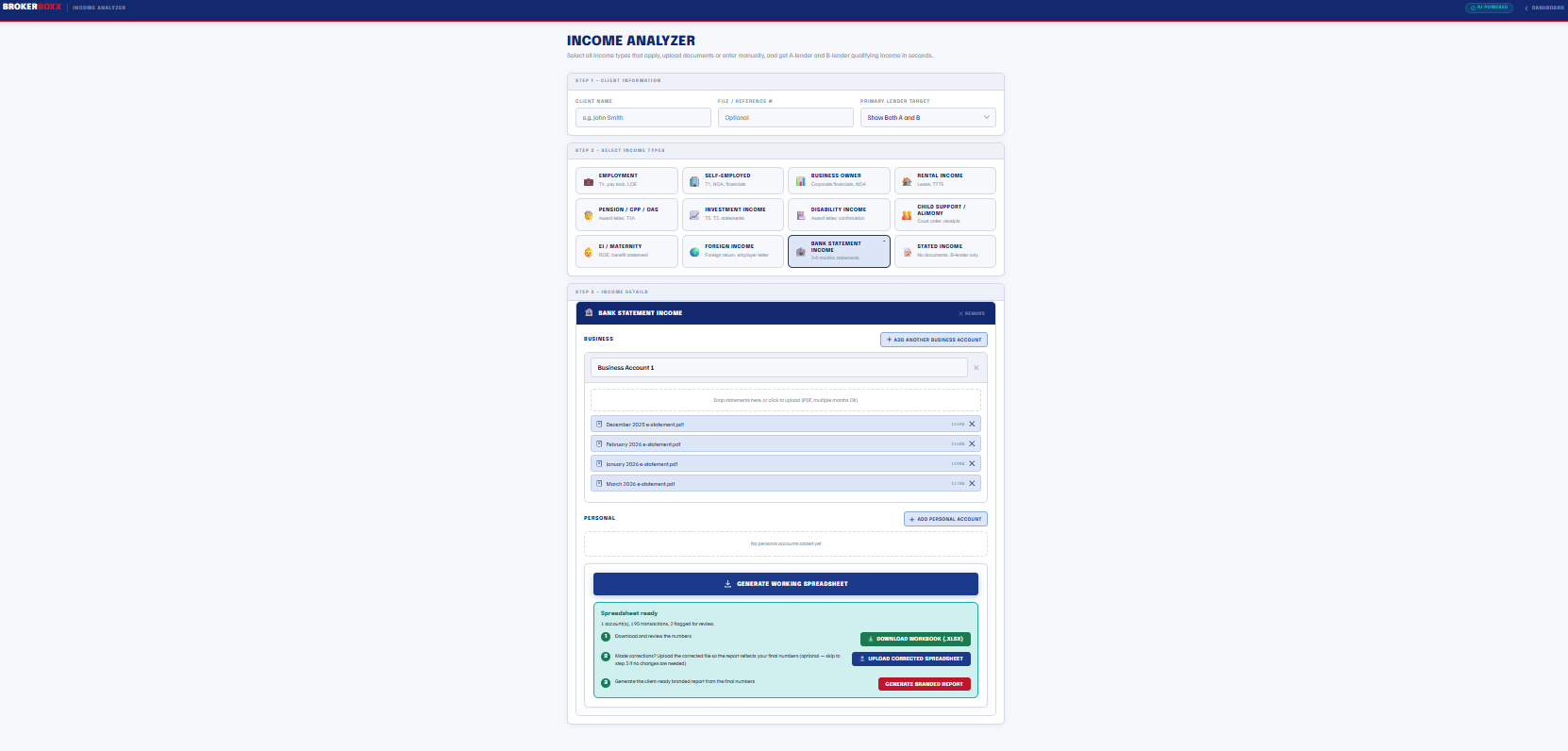
Bank statement income reads months of statements per account, builds a working spreadsheet you can review and correct, then generates the final report from your confirmed numbers
Deposit flags built in: NSFs, large deposits, CRA activity, and transfers between the client's own accounts
A large self-employed file runs in minutes instead of taking your evening
Income Analyzer processing four months of business bank statements with the review workflow: download workbook, upload corrections, generate branded report

Four months of business statements in, working spreadsheet out, you confirm the numbers before anything goes to a client

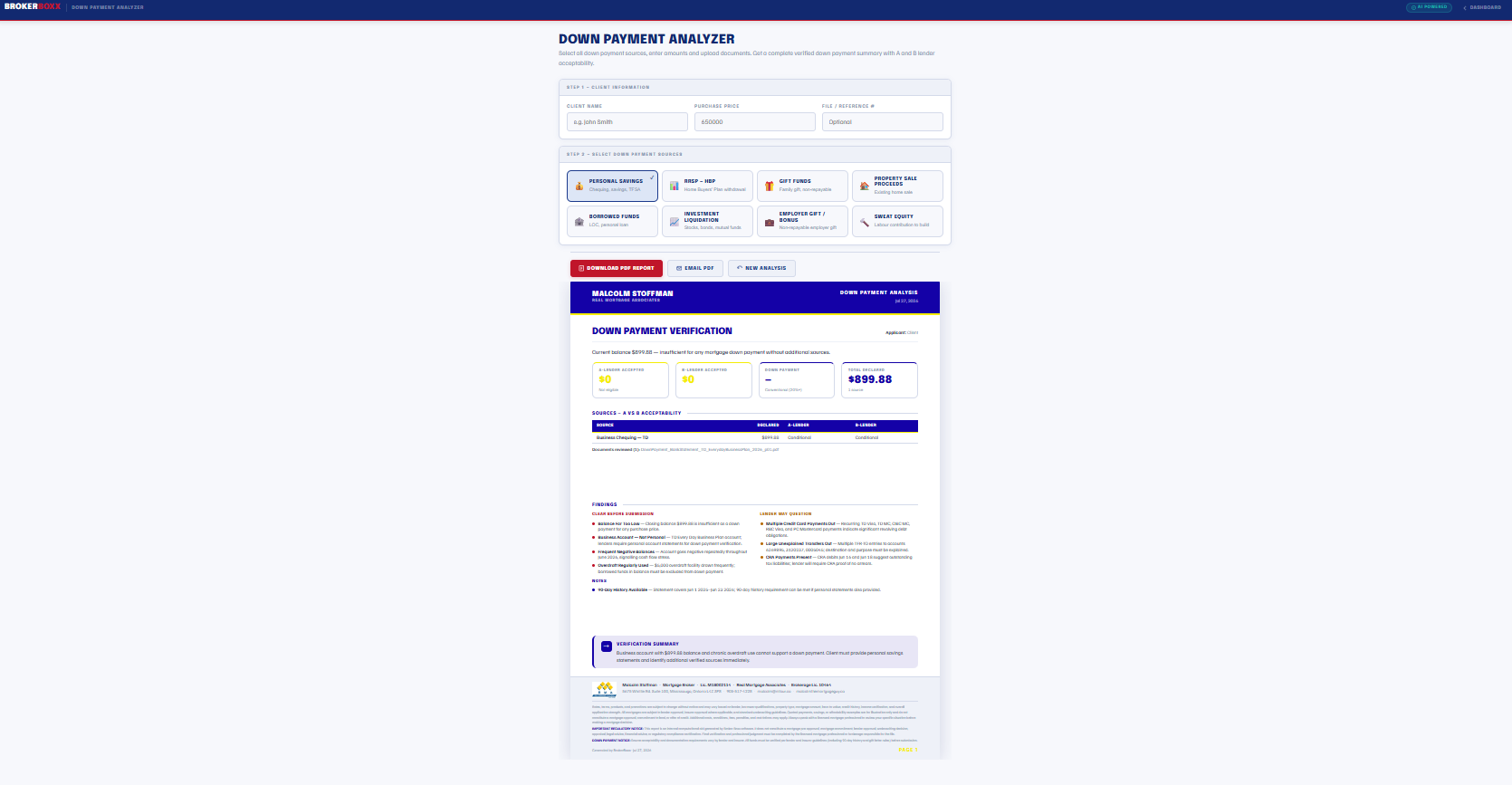
Down Payment Analyzer branded verification report showing source acceptability, findings to clear before submission, and lender questions

The report tells you what to clear up before the lender asks, not after

AI Powered

Down Payment Analyzer

Savings, RRSP, gifts, property proceeds, borrowed funds, investments, sweat equity. Select the sources, upload the statements, and get a verified summary showing exactly what each lender tier will accept.

90-day history checked against the actual statements, with unexplained transfers surfaced
Findings sorted by urgency: what to clear before submission versus what a lender may question
A and B acceptability per source, so a conditional source never surprises you at approval
Catch the problem deposit on Tuesday, not in the lender's conditions on Friday
AI Powered

Deal Structurer & Commitment Summary

Two tools that bracket the deal. Before submission, the Deal Structurer takes the full client scenario and recommends the lender tier, product type, and structure, flagging the issues that would bounce the file. After approval, upload the commitment letter and get a plain-English summary of the terms, conditions, and dates your client needs to understand.

GDS and TDS at the stress test rate, lender tier logic, and property restriction flags
Document checklist generated from the deal, so the client collects everything once
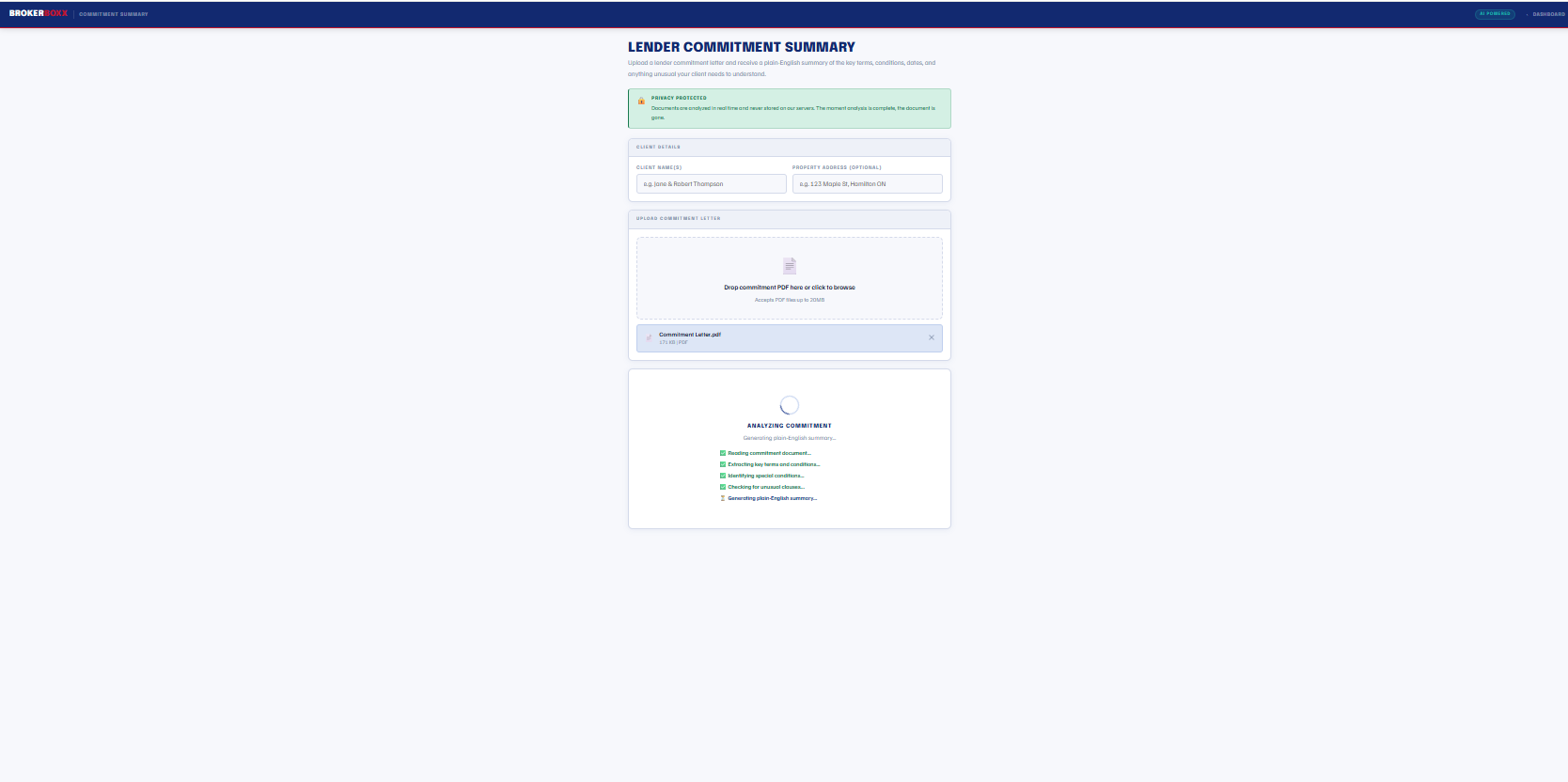
Commitment conditions and key dates extracted and explained in language clients follow
Walk into the submission knowing how it qualifies, and out of the approval knowing what your client signed
Lender Commitment Summary tool analyzing an uploaded commitment letter and generating a plain-English summary

Upload the commitment, get the plain-English version your client will actually read

Property Valuation branded report with conservative, midpoint, and optimistic values, neighbourhood analysis, and review flags

Conservative, midpoint, and optimistic values with the reasoning shown, not just a number

AI Powered

Property Valuation

Type the address, confirm it on the map, add the property details, and get a valuation analysis with market context, comparable reasoning, and a confidence range, delivered as a branded report you can put in front of a client the same hour they call.

Address autocomplete and interactive map confirm you are valuing the right property
Strengths, considerations, and flags laid out the way an underwriter reads a file
Clearly framed as pre-appraisal context, with the appraisal caveats stated on the report
Answer "what do you think it's worth" with a document instead of a guess
AI Powered

Document Fraud Checker

Run any client document through a screening pass before it goes to a lender. Metadata, internal math, formatting consistency, date logic, and layout anomalies, summarized with an overall risk level and plain-language notes on anything flagged.

Findings presented for your judgment, never a verdict; it is a screening aid, and it says so
Catches the quiet edits: modified creation dates, mismatched fonts, totals that do not add
Protects your relationships with the lenders who fund your pipeline
The altered pay stub gets caught at your desk, not attached to your submission
BrokerBoxx tool interface showing the consistent step-by-step workflow shared across analysis tools

Every tool follows the same three-step pattern, so the second tool you learn takes no learning at all

Your Brand, Everywhere

To your clients, all of this looks like you built it

Every report, every calculator, every page carries your name, your licence, your colours, and your logo. BrokerBoxx stays in the engine room. You take the credit, because the professional standing at stake is yours.

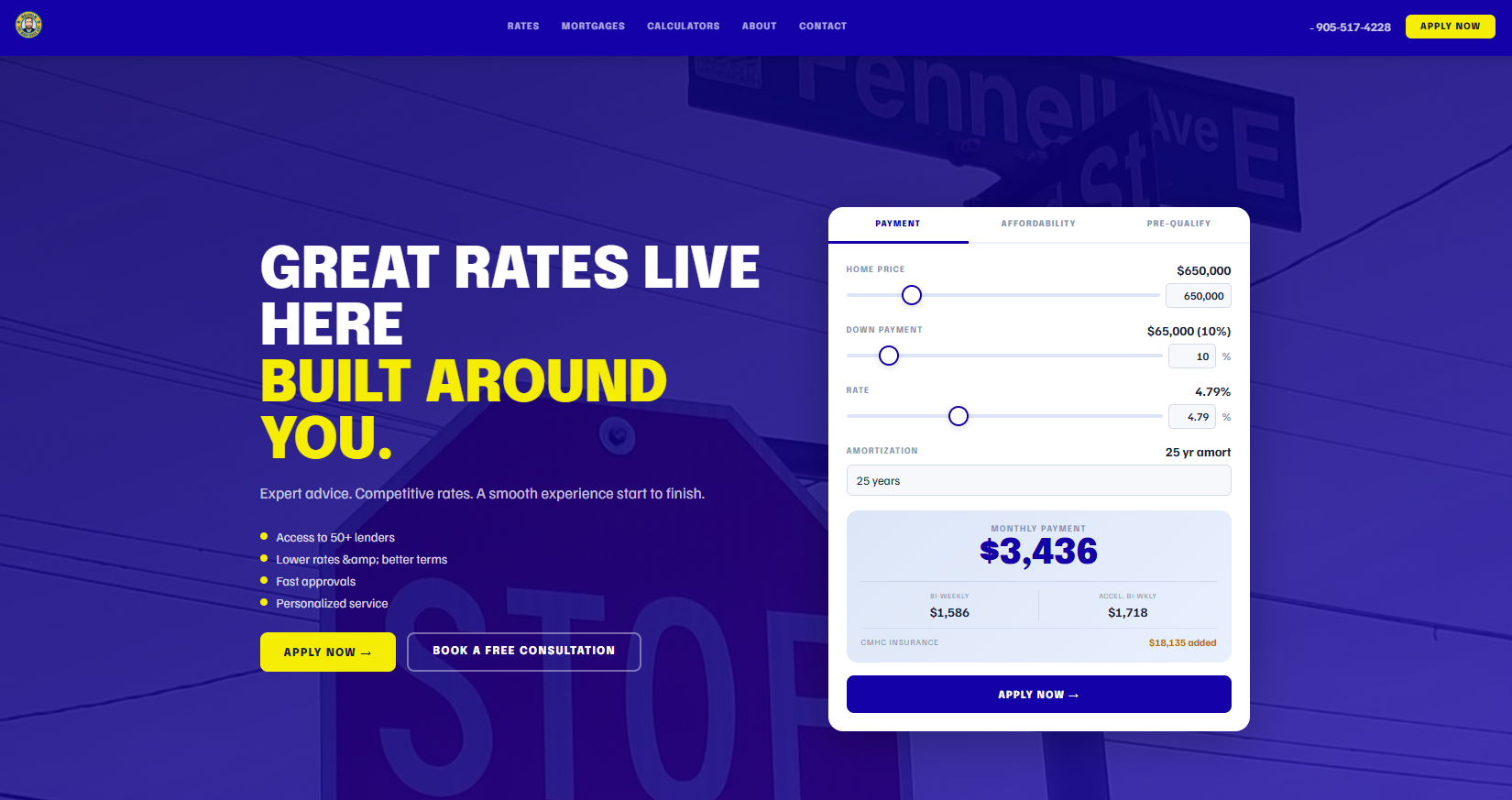
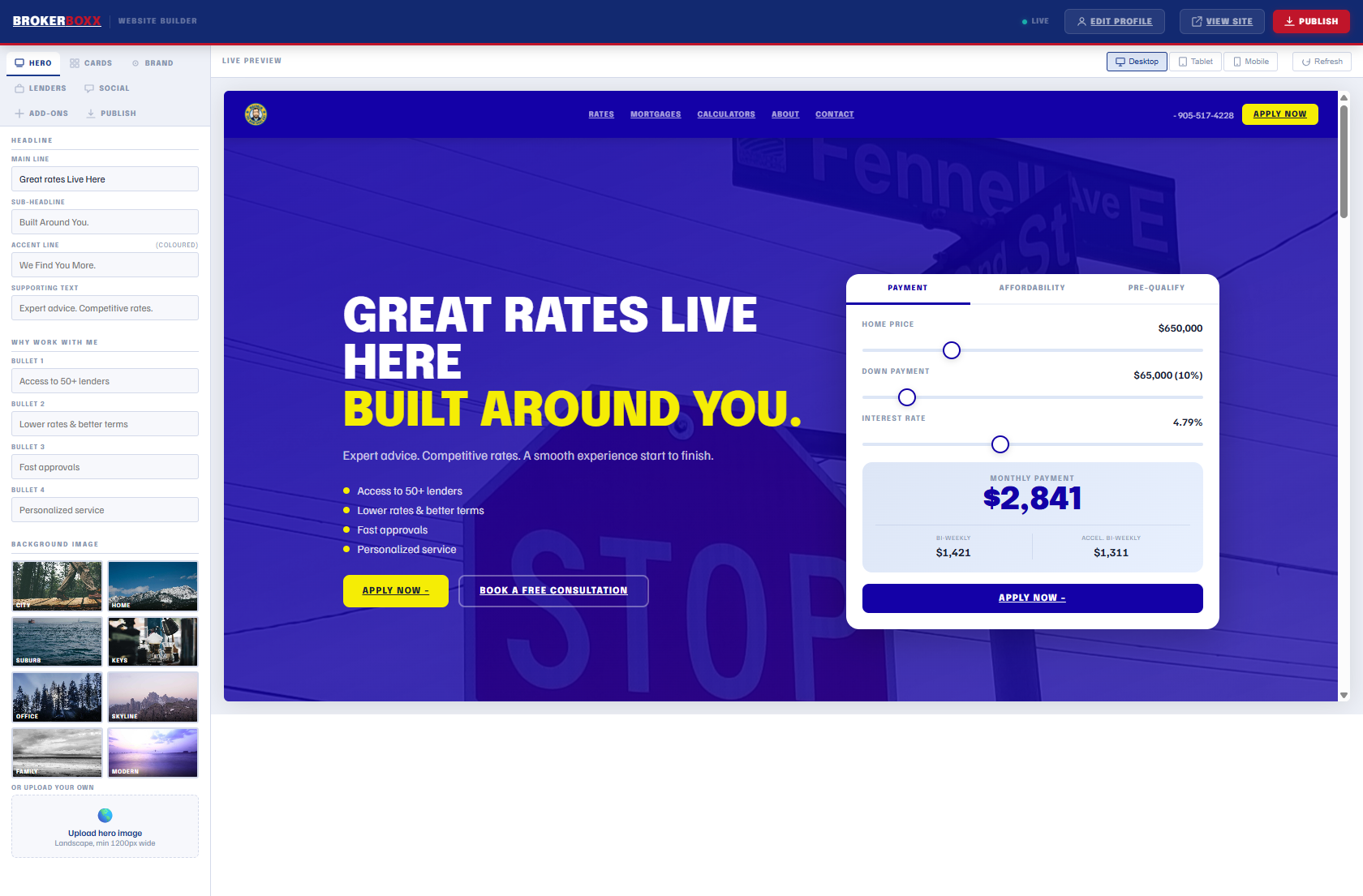
The BrokerBoxx website builder editing a live broker site with hero headline, calculator, and apply buttons

A real broker website in an afternoon

Generated from your profile, edited live, published to your own page. Hero, rates, calculators, about, contact, licensing disclosure. Mobile responsive out of the box, no web developer on retainer.

Included in every plan. Add-ons: live rate cards $9.99/mo, website calculators with lead capture $5.99/mo, keep your own URL $5.99/mo.

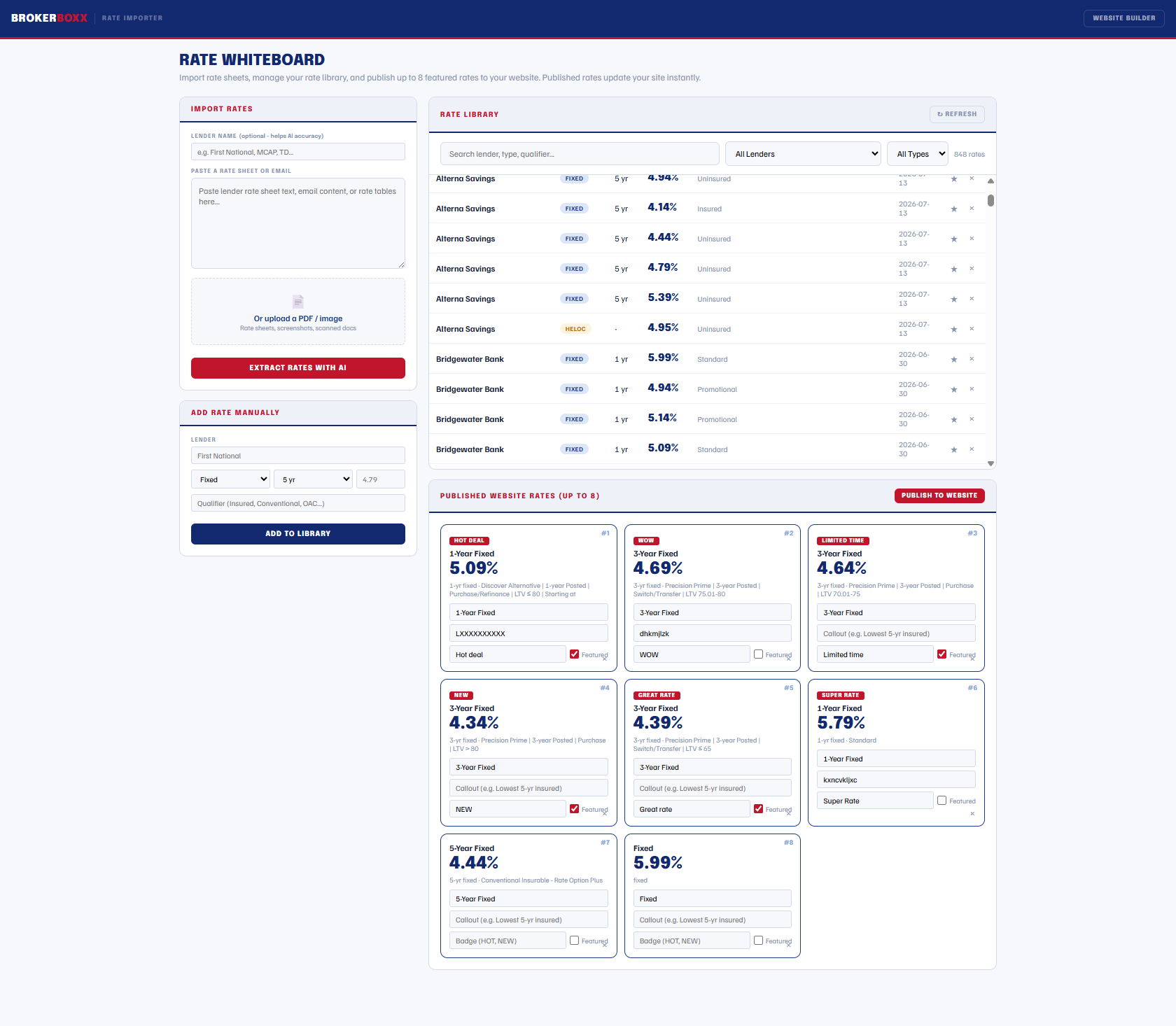
The Rate Whiteboard importing lender rate sheets with AI and publishing up to eight featured rates to a broker website

Rates that update themselves everywhere

Forward any lender rate email to your import address, or paste a rate sheet, and the library updates. Publish up to eight featured rates and every surface refreshes at once: your website, your dashboard, your embed.

Your site quoting this morning's rates is a habit, not a project.

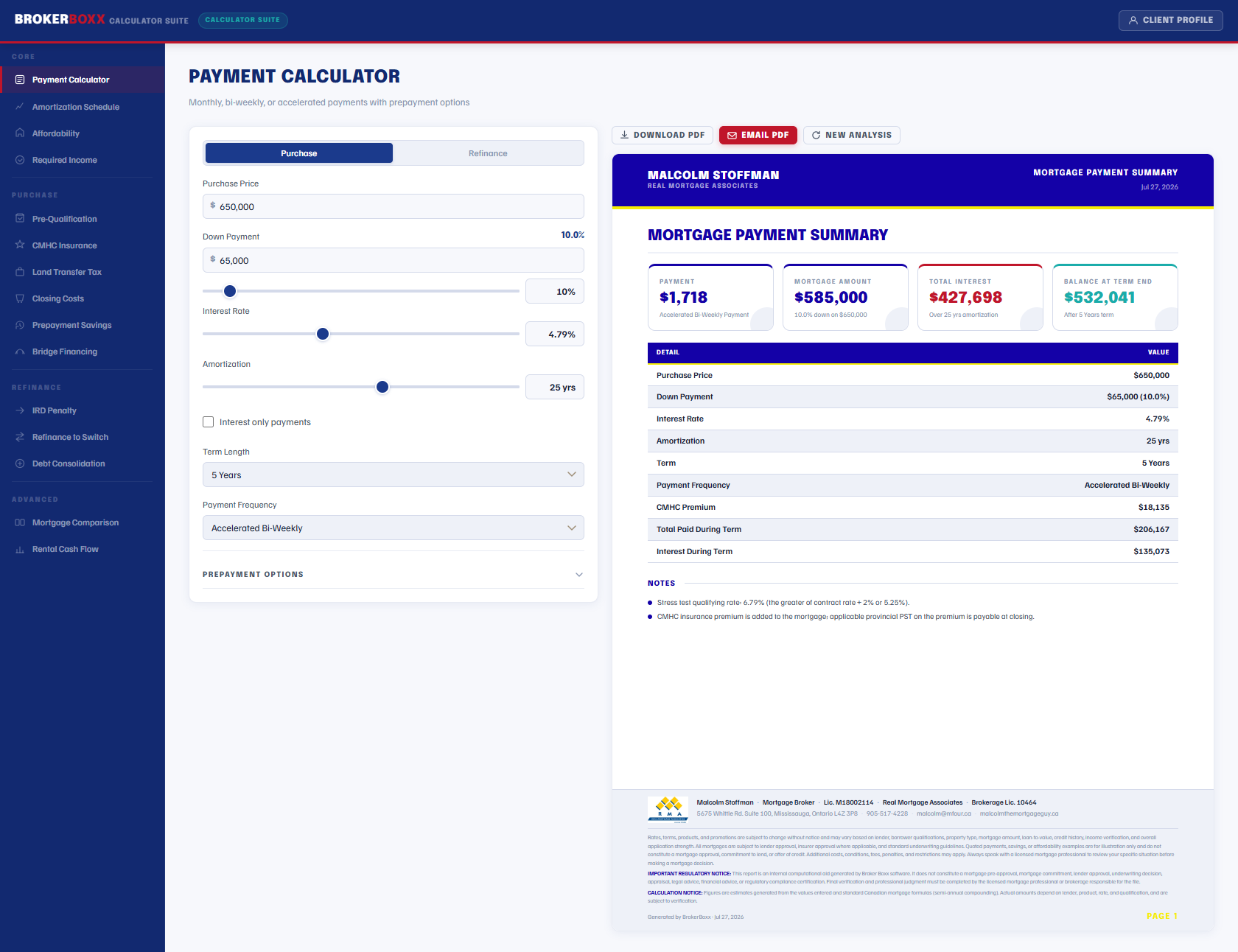
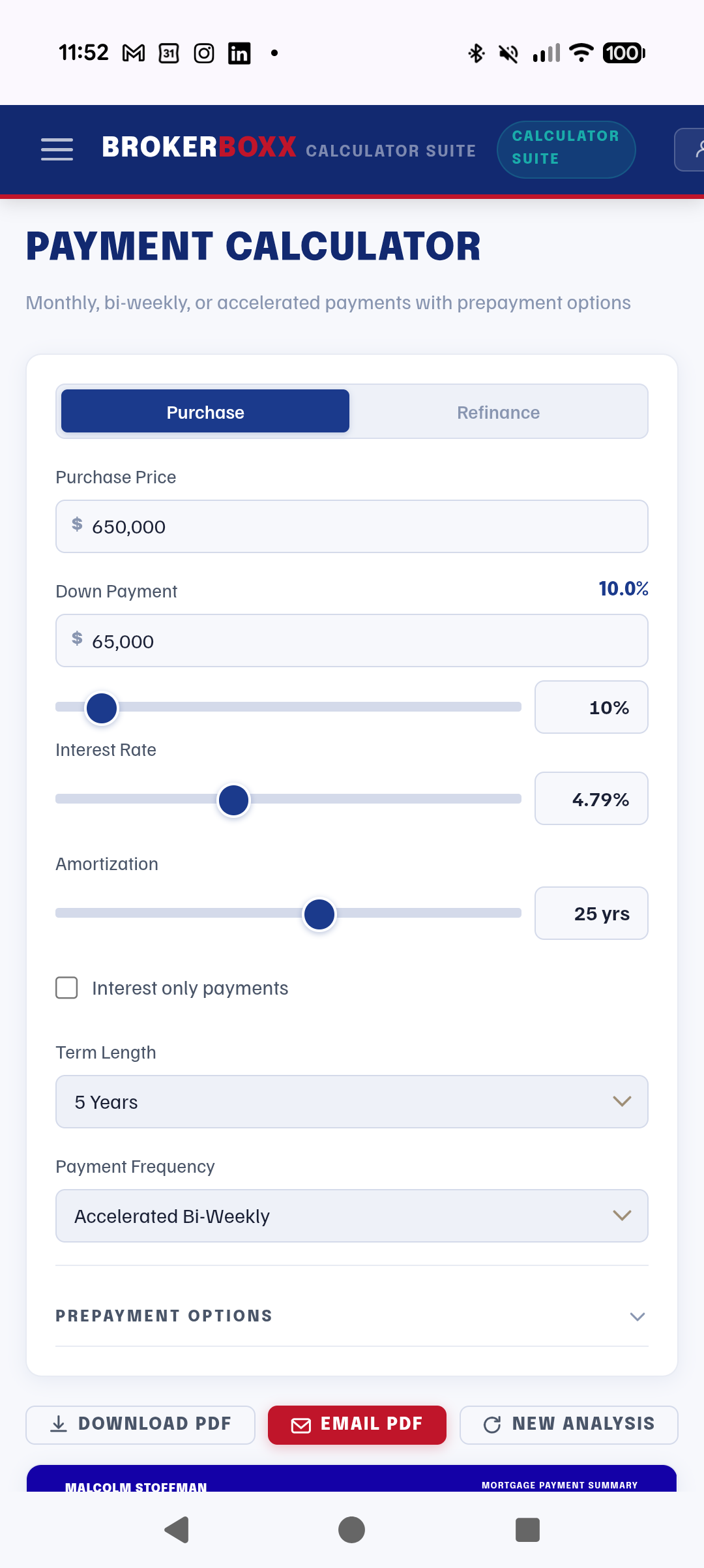
The Payment Calculator with a branded Mortgage Payment Summary report showing Canadian semi-annual compounding and CMHC premium

Fourteen calculators that get Canada right

Payment, amortization, affordability, required income, CMHC, land transfer tax for every province, closing costs, prepayment, bridge, IRD penalty, refinance, debt consolidation, comparison, and rental cash flow. Semi-annual compounding and the stress test in every result, PDF export on every one.

The math your clients see is the math the lender uses.

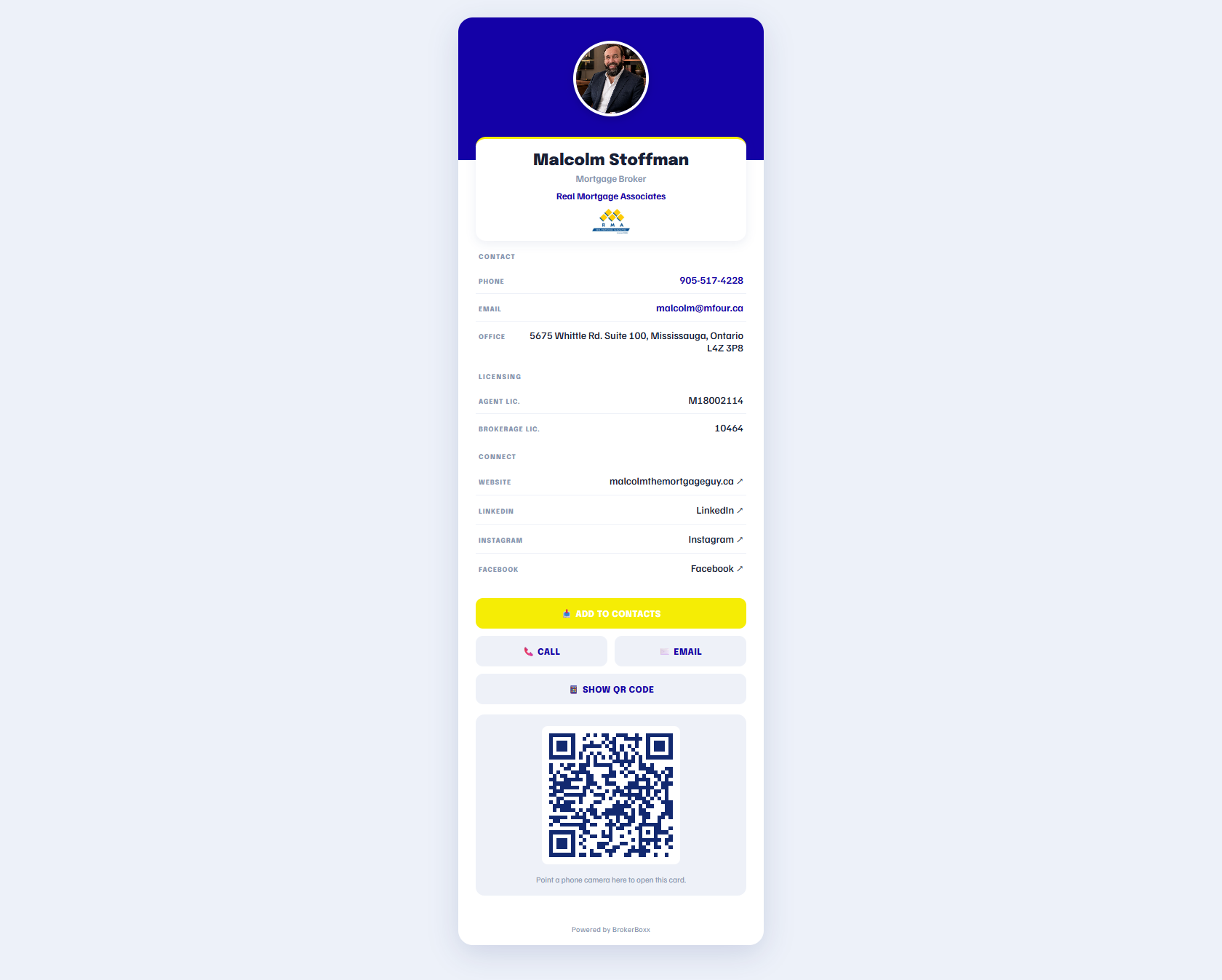
A branded digital business card with QR code, contact details, licensing, and add to contacts button

The card nobody throws away

A mobile digital business card with your photo, licensing, one-tap call and email, and a QR code that saves you straight into a client's contacts. Share it by text, email, or a tap at an open house.

Coming soon: Reputation Builder, turning closed files into Google and Facebook reviews with automatic follow-ups and a consent-tracked testimonial library.

Desktop and Mobile

The whole platform works from your phone

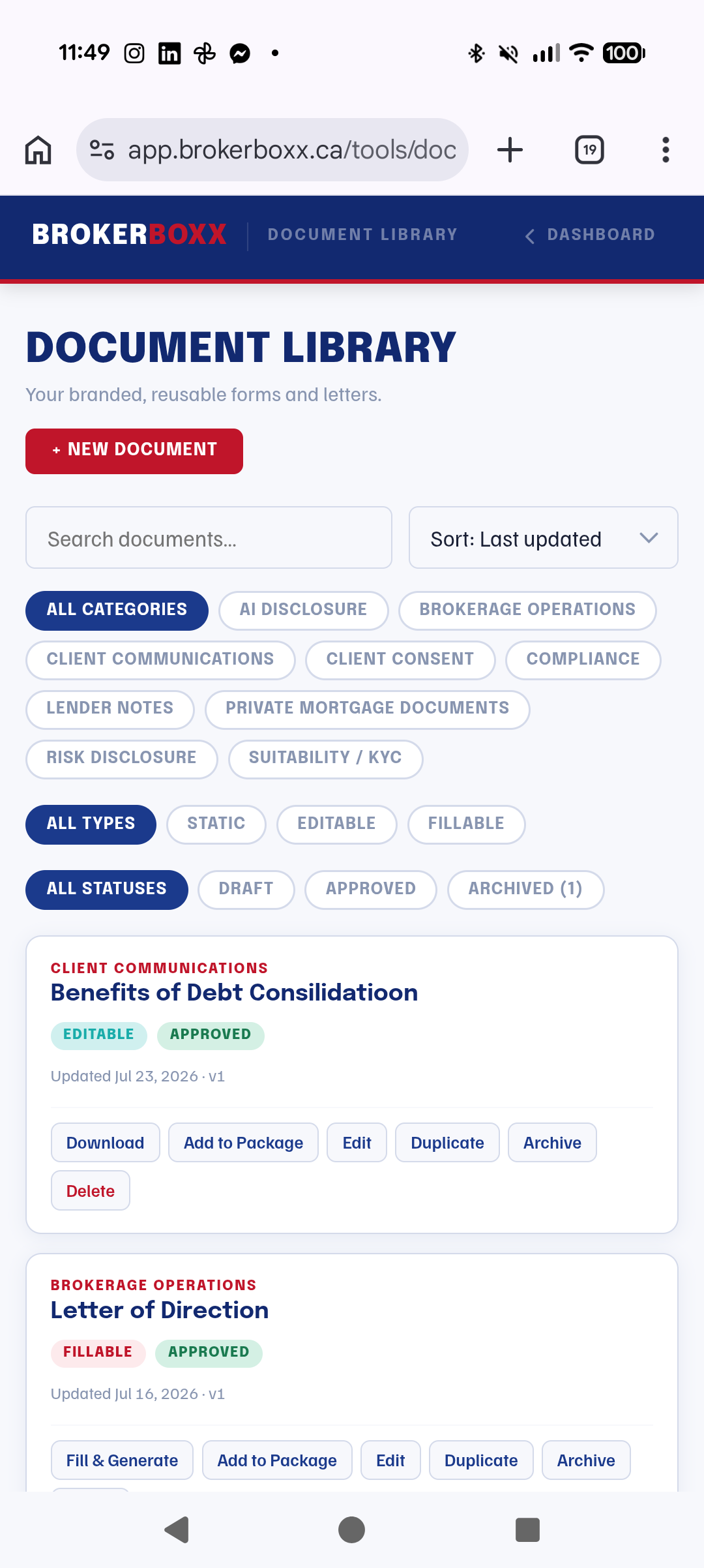
Run an income analysis from a kitchen table. Update your published rates from the car. Pull a payment summary in front of the client. These are photographs of the live product on a phone, not mockups.

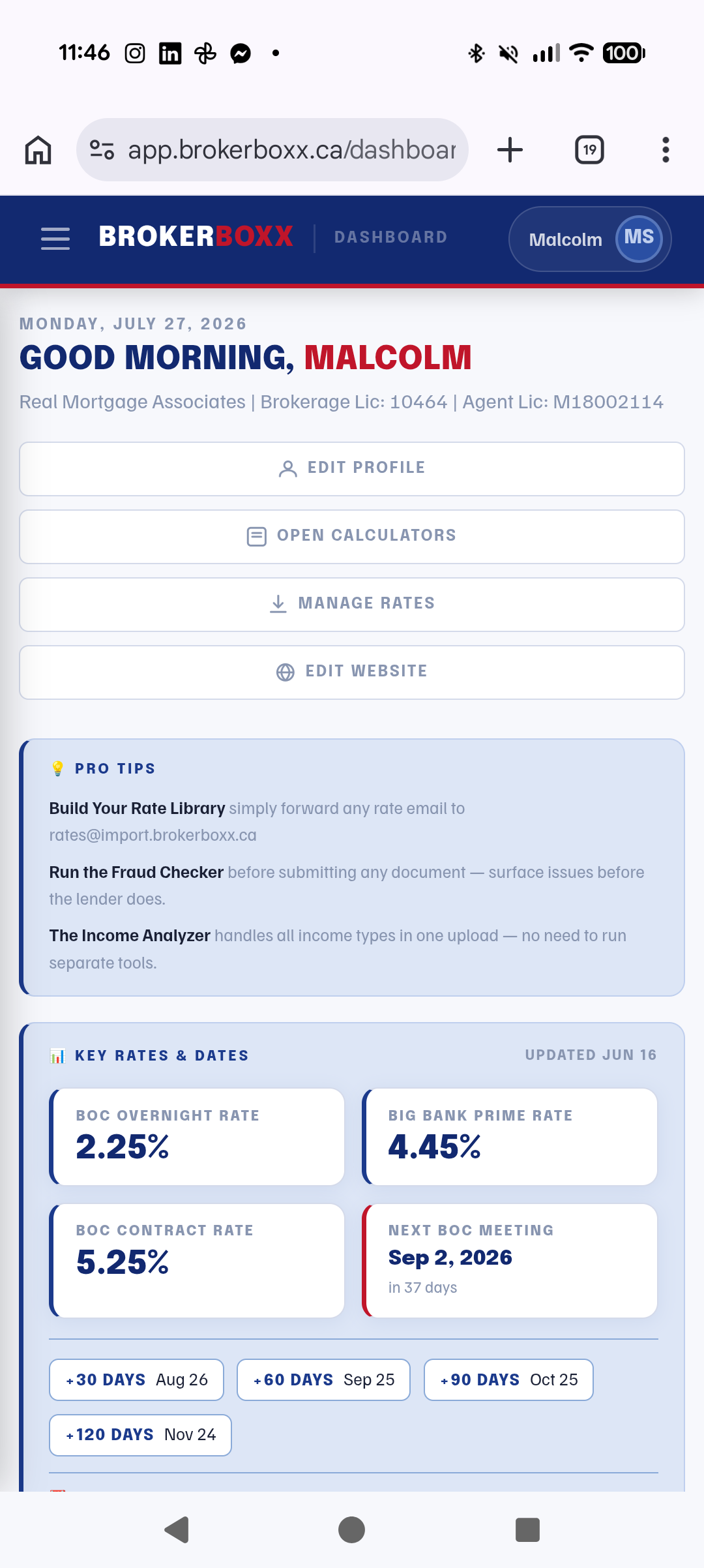
The BrokerBoxx dashboard on a phone
Dashboard
A branded income analysis report generated on a phone
Income Report
The rate whiteboard managed from a phone
Live Rates
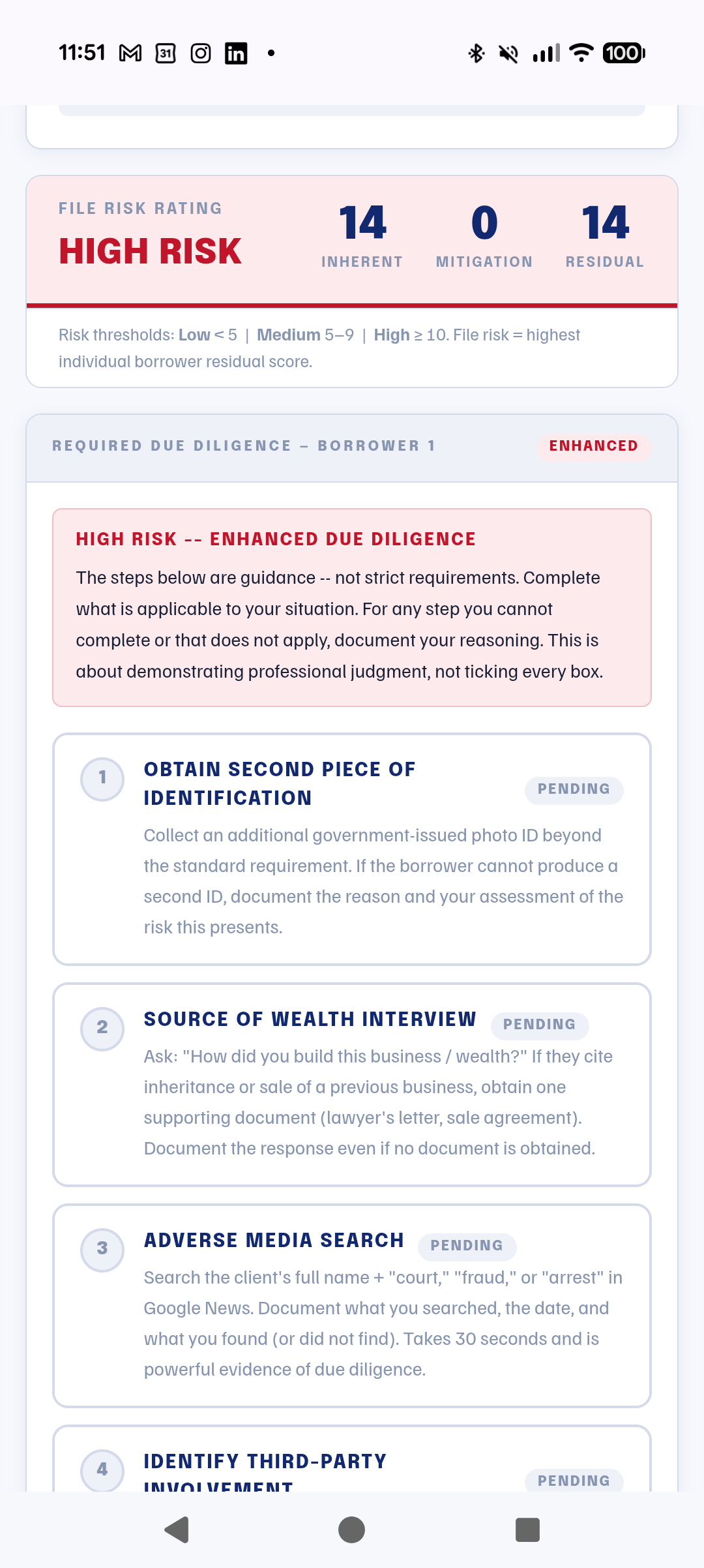
The AML risk assessment completed on a phone
AML Assessment
Getting Started

Producing branded work before your coffee cools

01

Sign up and build your profile

Name, licence, brokerage, colours, logo, headshot. A six-step wizard, about five minutes. This single profile brands every report, calculator, and page the platform produces for you from then on.

02

Run your first real file

Bring the messy one. Upload the statements, pick the income types, and watch the working spreadsheet come back with the flags already raised. Review it, correct anything, generate the report.

03

Send work that looks like you

Publish your website, set your featured rates, and start handing clients documents with your name and licence on them. The trial is the full platform, so what you test is what you get.

Pricing

Priced like a tool, not a second office lease

Every plan includes every tool: all five AI analyzers, the compliance suite, all fourteen calculators, your website, and branded reports. Team plans lower the per-seat price as you grow. Annual billing gives you one month free.

For one broker
Solo
$69.99/mo
Includes 1 seat. Additional seats $59.99 each.
All 5 AI analysis tools
Full compliance suite
All 14 calculators
Branded reports and PDFs
Your broker website
Start Free Trial
For growing teams
Team 5
$59.99/mo
Includes 1 seat. Additional seats $49.99 each, up to 5 agents.
Everything in Team 3
Best per-seat pricing
Admin support seats $29.99
Annual: one month free
Start Free Trial
10 or more agents
Brokerage
Custom
Negotiated pricing for brokerages and networks. White label available.
Everything in Team 5
Unlimited agents
White label branding
Brokerage-level oversight
Contact Us
Website Add-Ons Live rate cards $9.99/mo Calculators with lead capture $5.99/mo Keep your URL $5.99/mo

All prices in Canadian dollars. 14 day free trial on every plan, card required at signup, first charge on day 15 unless you cancel.

Questions Brokers Ask

Straight answers before you start

Why do you need my credit card for a free trial?
So billing starts without a hiccup if you stay, and honestly, because it keeps the trial for working brokers rather than tire kickers. You get full access to everything for 14 days, your first charge lands on day 15, and cancelling before then costs you nothing. Cancellation is a button in your account, not a phone call.
Is my client data safe? Where does it live?
Client documents are never stored. They are analyzed in real time and discarded the moment analysis completes, which means there is no archive of your clients' bank statements sitting on a server. Your account data, profile, and rates are hosted in Canada. Document analysis is processed by our AI provider under contractual safeguards, disclosed plainly in our privacy policy.
Is this actually built for Canadian mortgages?
It is built for nothing else. Semi-annual compounding, the OSFI stress test, CMHC premiums and PST by province, GDS and TDS at A and B thresholds, land transfer tax for every province and territory including Toronto's municipal tax and first-time buyer rebates. The founder is a practicing Ontario broker, and the lender logic comes from real files, not a US product with a maple leaf on it.
Do the AI tools replace my judgment?
No, and they are built not to. Every analysis is presented for your review, the bank statement workflow has you confirm the numbers before a report generates, and the fraud checker reports findings rather than verdicts. You are the licensed professional, your name is on the output, and the tools are structured around that reality.
What does FINTRAC compliance support actually mean here?
Two working tools, today. A borrower risk assessment scorecard that applies occupation and jurisdiction screens, scores inherent risk, applies mitigating factors, and generates the due diligence checklist for the residual risk level. And an escalation assistant for files that raise concern, which documents the facts and produces a confidential internal escalation with the reporting thresholds and timelines applied. Both generate reports for your file. Neither files anything with FINTRAC or replaces your brokerage's compliance policies, and both say so on the page.
I am not technical. How long until I am actually using this?
The profile wizard takes about five minutes, and your first analysis is a matter of dragging documents into a browser. There is nothing to install, and it works the same on your phone as your desktop. If you can attach a PDF to an email, you can run every tool on the platform.
What happens to my work if I cancel?
Every report and spreadsheet you generated was downloaded to you when you made it, so your client files are already yours, on your machine. Client documents were never stored to begin with. Cancel in your account settings and billing stops at the end of your period.
We are a brokerage with more than 10 agents. Is this for us?
Yes, and that conversation is worth having directly. Brokerage deployments are priced as negotiated agreements with white label available, and the platform's compliance and standardization story is strongest at brokerage scale, where consistent files across every agent is what a Principal Broker answers for. Reach out and we will walk through it with you.

Your next file could take an hour less

Fourteen days, the full platform, your brand on everything it produces. Bring your messiest self-employed file and see what happens to your evening.

Start Your 14 Day Free Trial

Card required at signup. First charge after 14 days. Cancel anytime in your account.